CLAHE Local Contrast
Reveal local tonal differences with contrast-limited adaptive histogram equalization.
Drop your image here
Drag and drop, or choose a file below
JPG · PNG · WEBP
Up to 250 MB · One image at a time
Each image: up to 16 megapixels and 8192 px per side
This is local tonal remapping, not exposure recovery. More tiles act on smaller regions; high clip factors can amplify noise. RGB clipping can change saturated colors. Tiny images use fewer tiles, and results differ from Lab-space implementations.
Original
Choose an image or try the sample to see your preview here.
100% local processing
How to use
- 01
Choose an image or try the local sample.
- 02
Start with 8 tiles per side, clip factor 3 and strength 70%; reduce strength if grain becomes visible.
- 03
Review the result and download the file.
Try a reproducible example
Compare the faint lettering and shadow gradient. CLAHE increases local contrast; it can also make paper texture more visible. This synthetic example does not prove that missing text in a real document can be recovered.
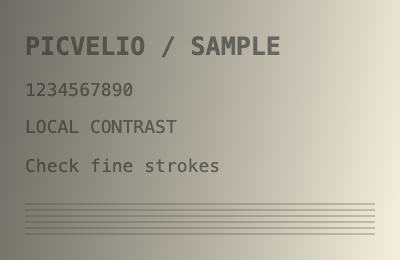
400 × 260 px · 138,633 bytes
Download this file ↓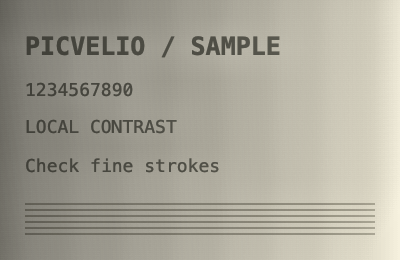
400 × 260 px · 166,173 bytes
Download this file ↓Processing settings
- Tiles per side
- 8
- Histogram clip factor
- 3
- Contrast strength (%)
- 70
Created by Picvelio on 12 November 2026 from original synthetic artwork using the same code as the tools. Download the input, open the saved settings, then choose that file. File sizes are measured bytes; results with other inputs or browsers can differ.
Open these settings →Details and tips
How it works
Builds 256-bin sRGB-luma histograms per tile, weighted by alpha. Clips large bins relative to the average bin weight, redistributes excess and interpolates neighboring mappings to avoid hard tile seams. A shared RGB offset applies the mapped brightness while keeping alpha. Empty or constant tiles use the identity map.
Made for everyday images
Improve uneven low contrast in scans, textured surfaces and hazy photographs before mild sharpening.
Frequently asked questions
Are images uploaded?
No. Processing, previews and downloads stay on your device.
What are the limits?
JPG, PNG and WebP, up to 250 MB, 8192 pixels per side and 16 million pixels. Expanded output must also fit these limits. Animation uses one still frame.